引言
在现代网络应用中,数据加密是保护敏感信息的关键。然而,在安全测试中,测试人员需要解密这些数据以分析和识别潜在的漏洞。手动处理这些加解密过程不仅耗时,而且容易出错。因此,本文提出了一种结合 Galaxy 和 JsRpc 的自动化解决方案,帮助安全测试人员更高效地进行数据解密和分析。
背景知识
Galaxy 工具介绍
Galaxy 是一个强大的 Burp Suite 插件,允许用户在 HTTP 请求和响应流转过程中插入自定义处理逻辑。通过这种方式,测试人员可以实现请求的自动解密和响应的自动加密,极大地简化了测试流程,相比于autodecode r,灵活性更强了。
JsRpc 工具介绍
示例内容 :JsRpc 提供了一种在浏览器控制台中创建 WebSocket 客户端的方法,与服务器进行实时通信。通过 JsRpc,用户可以在客户端和服务器之间传递复杂的加解密逻辑,确保信息在传输过程中保持安全。
结合 Galaxy 和 JsRpc 的优势
示例内容 :通过将 Galaxy 的插件能力与 JsRpc 的实时通信功能结合,用户可以轻松地在复杂环境中实现自动化的加解密。Galaxy 负责在请求和响应流转中插入解密逻辑,而 JsRpc 则确保客户端和服务器之间的加解密逻辑能够动态更新和执行。
实现步骤
环境准备
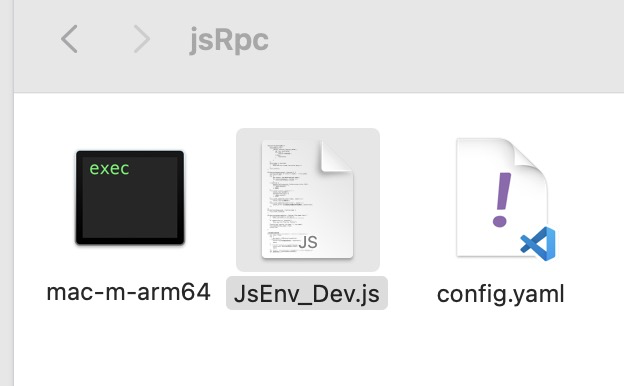
首先,确保已安装最新版本的 Burp Suite,并在其上安装 Galaxy 插件 。接下来,设置 JsRpc 服务器和客户端环境(确保jsRpc目录下有以下三个文件),以便进行后续的集成和测试。
配置 Galaxy
在 Galaxy 中定义请求和响应的钩子函数。通过这些钩子函数,用户可以在数据流转过程中插入自定义的解密逻辑,从而实现自动化的安全测试。
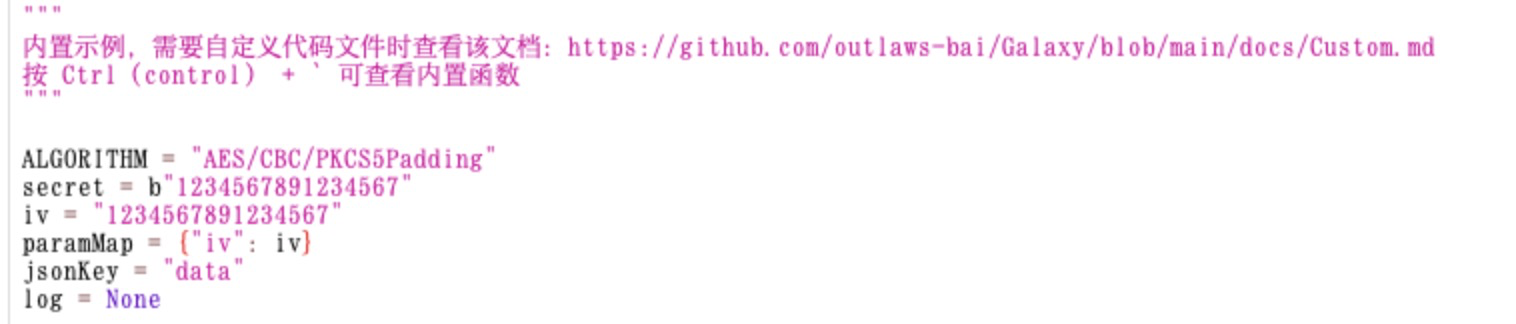
Galaxy作者已经为我们定义好了四个核心加解密函数以及需要定义的加解密key、iv、关键字等参数,只需傻瓜式替换即可:
四大核心函数:
解密:hook_request_to_burp(浏览器 → burpsuite 做解密展示明文数据 )
加密:hook_request_to_server(burpsuite → 服务端做加密确保信息同步)
解密:hook_response_to_burp(服务端 → burpsuite做解密展示明文数据)
加密:hook_response_to_client( burpsuite → 浏览器做数据加密确保信息同步),
测试靶场搭建
这里直接总结运行命令给大家用:
Text 1 2 3 4 5 6 7 8 9 10 11 git clone https://github.com/0ctDay/encrypt-decrypt-vuls cd encrypt-decrypt-vuls mvn clean package docker build -t library-service ./library docker build -t gateway-service ./gateway docker-compose up -d
JS逆向分析
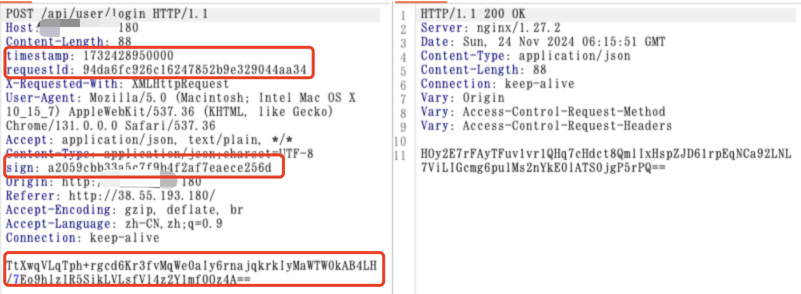
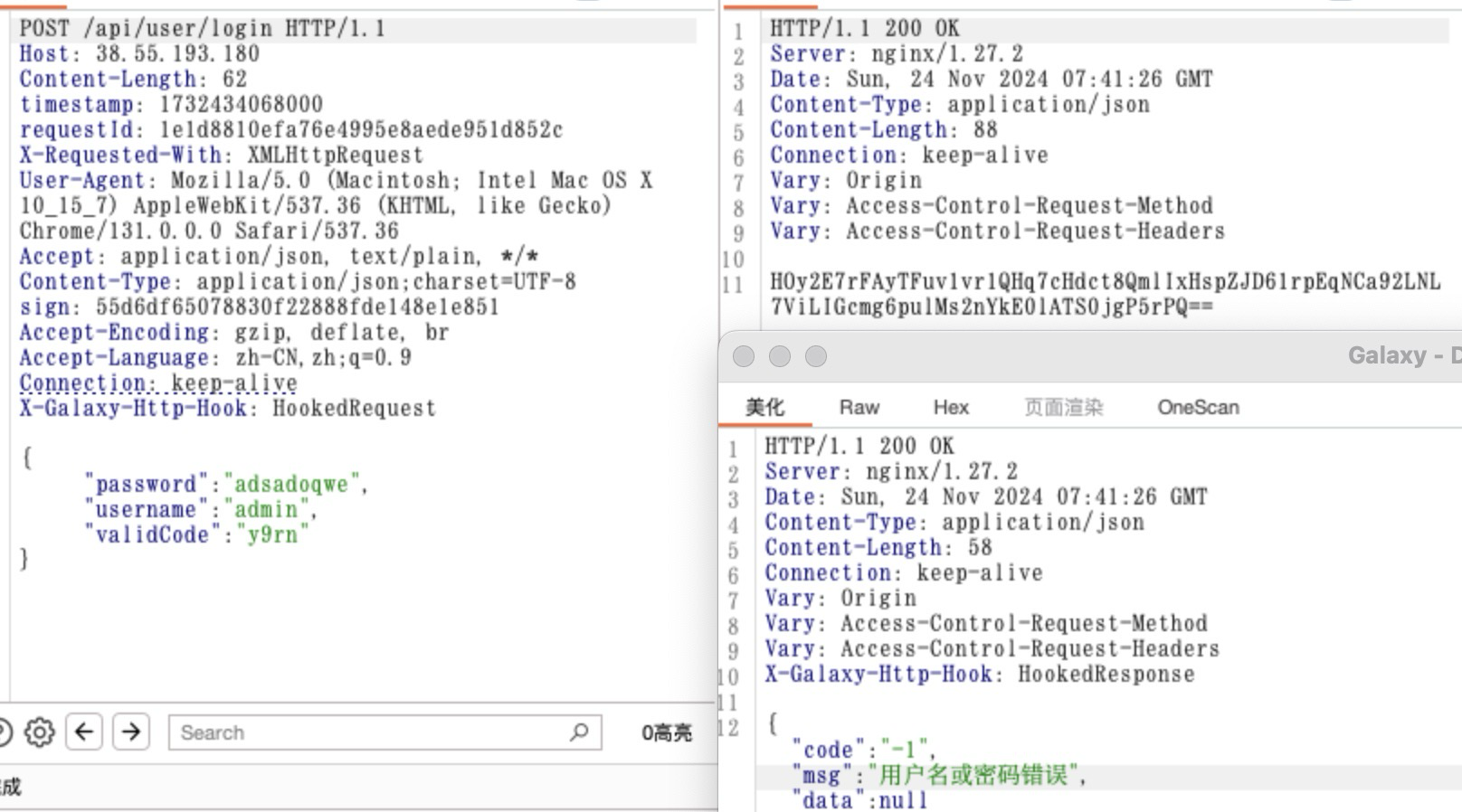
一、访问靶场地址,输入用户名密码后,拦截数据包如下:
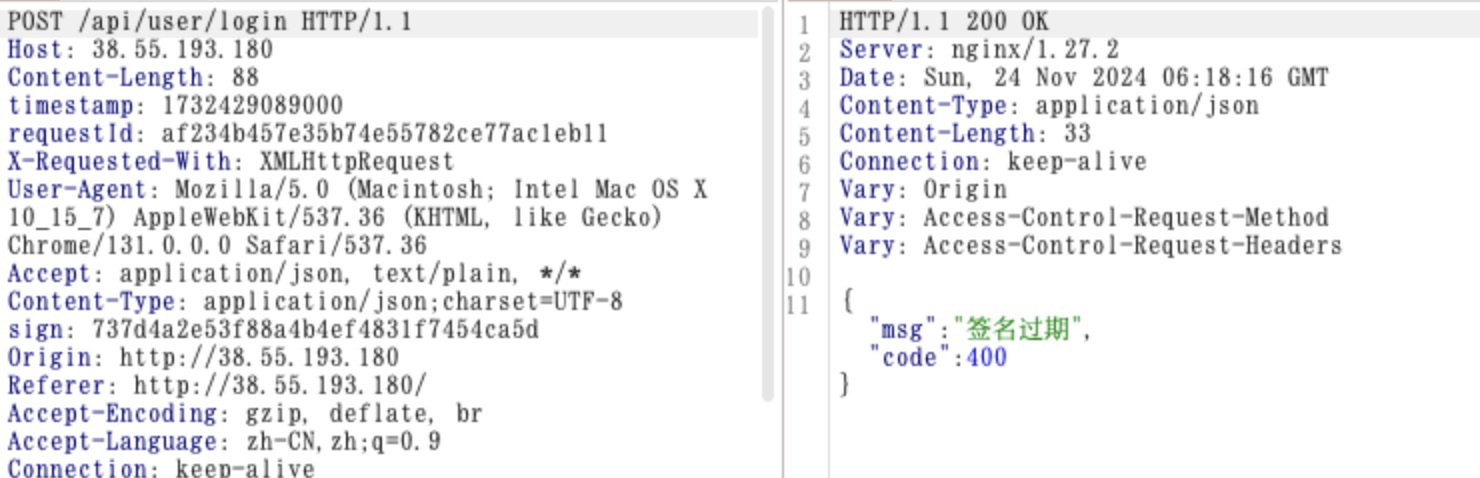
这时候我们发现请求头里包含了三个参数requestId、timestamp、sign缺一不可,改动任何一个都失效,且无法使用repeater重放数据,如何判断?修改这三个字段中任何一个都会报错,如下:
一般我们去判断是否有多动态验签,也可以去改一个字段看看返回是否一致。
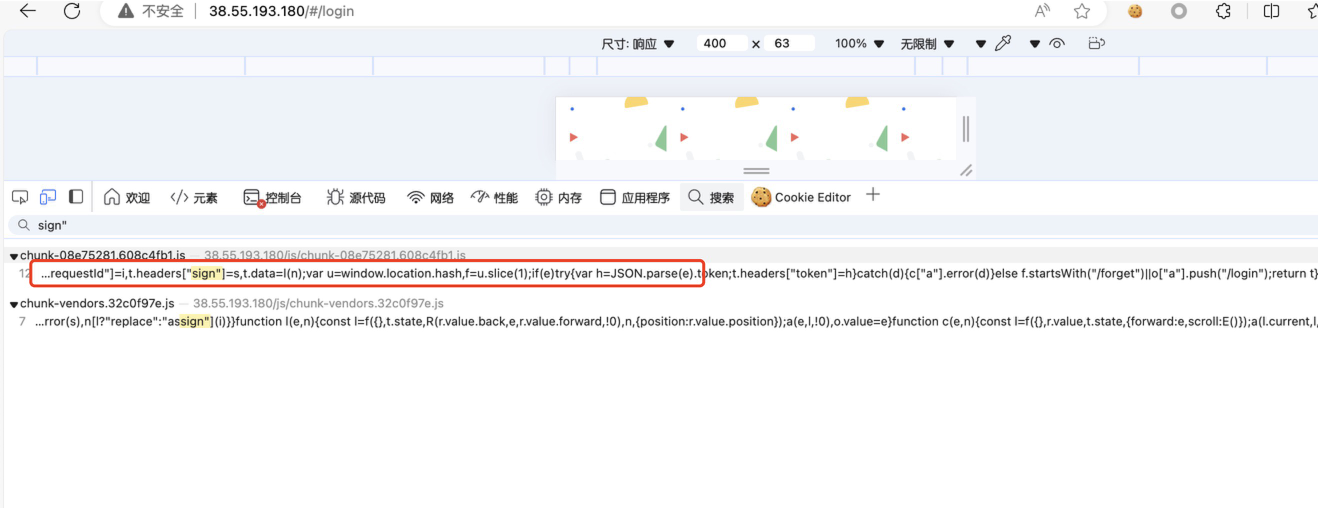
既然知道了参数动态验签,那么我们可以结合jsrpc去获取这些内容,再使用galaxy做个融合,实现动态加解密,正题开始,直接通过关键字sign:、sign”去定位加密逻辑。
列举其它快速检索加解密方法:
敏感词搜索:md5、sha1、encrypt、decrypt、JSON.stringify(数据填写后一定会做序列化进行请求发送操作)、json.parse(反序列化)、interceptors(拦截器,通常某一网站所有数据都做了加密,为了简便操作,会用拦截器做加解密操作)、请求路径定位、请求头或请求参数特殊关键字定位.
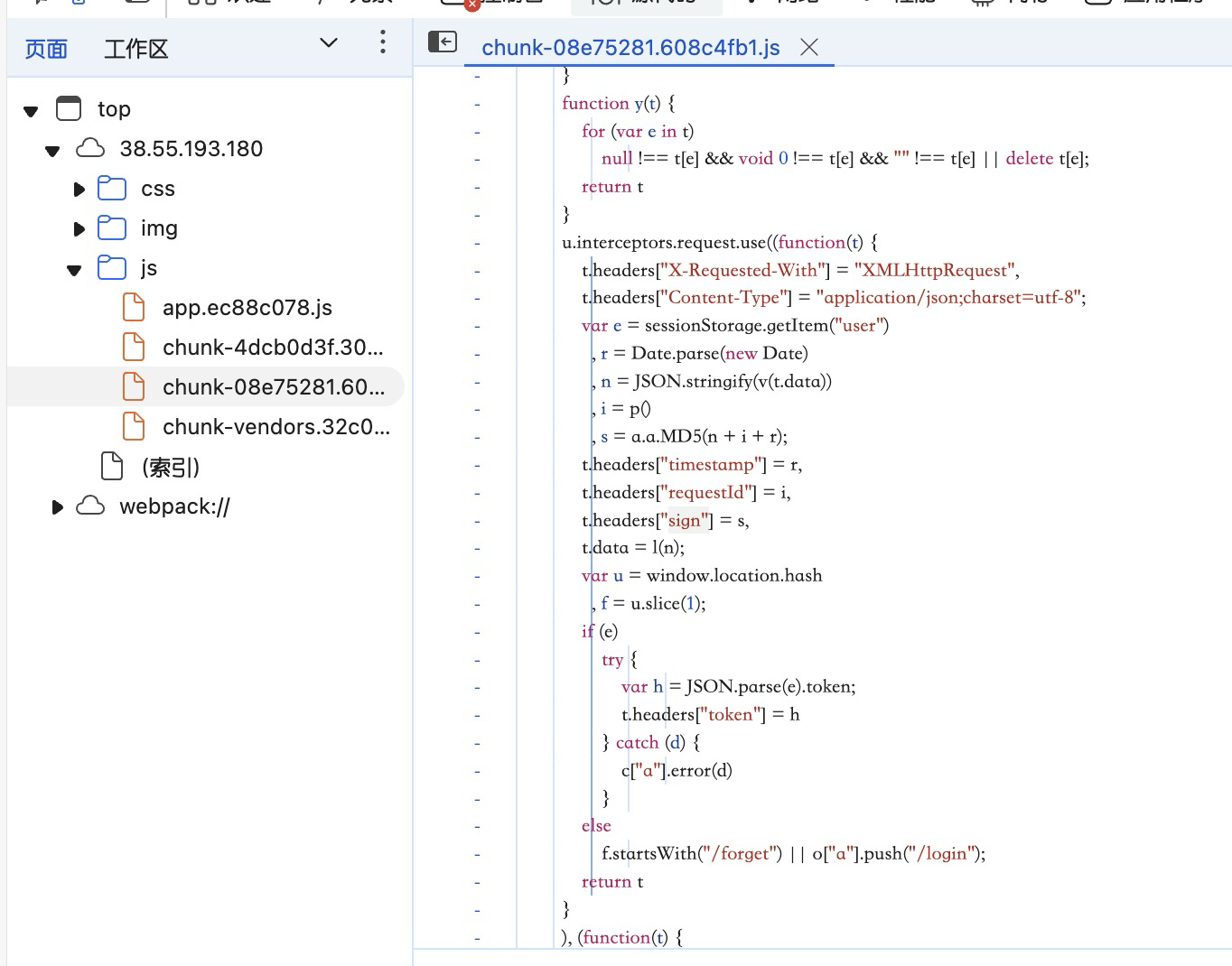
使用关键字定位发,成功定位到加密逻辑,如下:
可以看到timestamp为当前时间戳,requestid为函数p生成的东西(无需关注实现细节,引用jsrpc获取其值即可)、sign=md5(时间戳+p()+请求体)
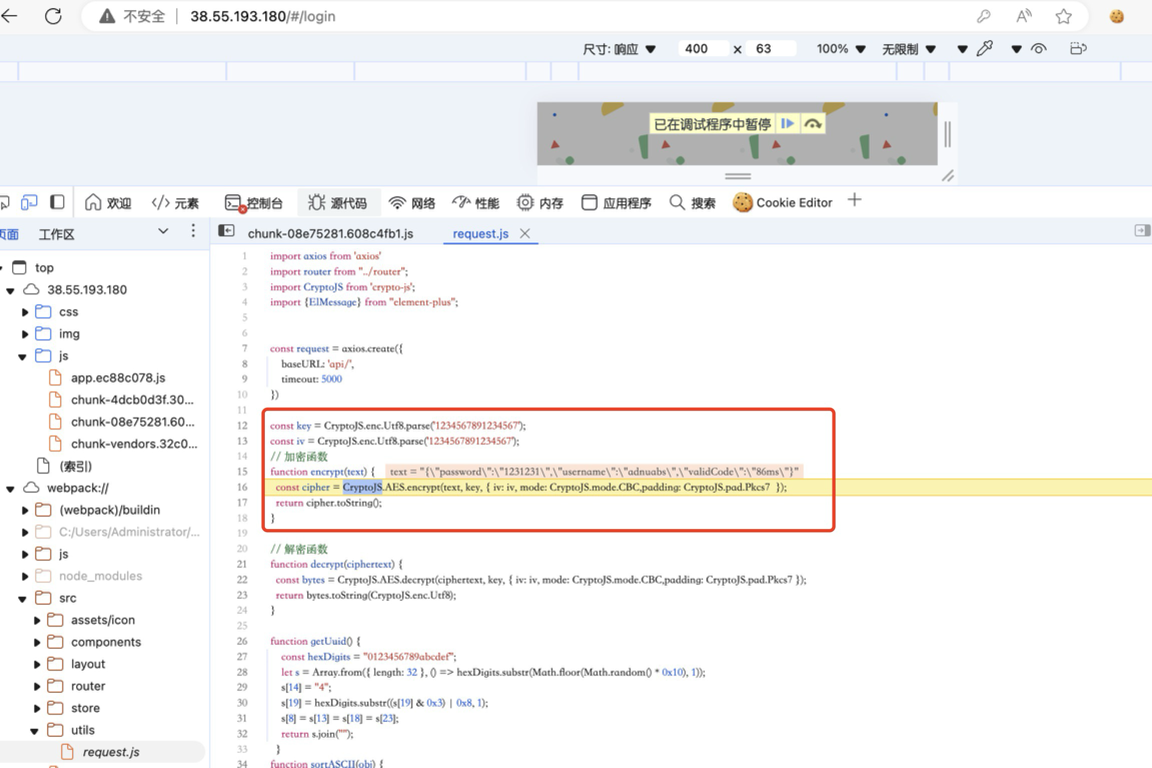
可以看到t.data=l(n),即l(n)为本次加密函数,看看加密逻辑是怎样的,在这里打断点调试:
获取到iv、key、加密算法定义。
注入JsRpc客户端及获取签名方法
在这里使用jsrpc调用接口执行js获取timestamp、requestId、sign三个请求头数据,而加密采用Galaxy自带加密模板。
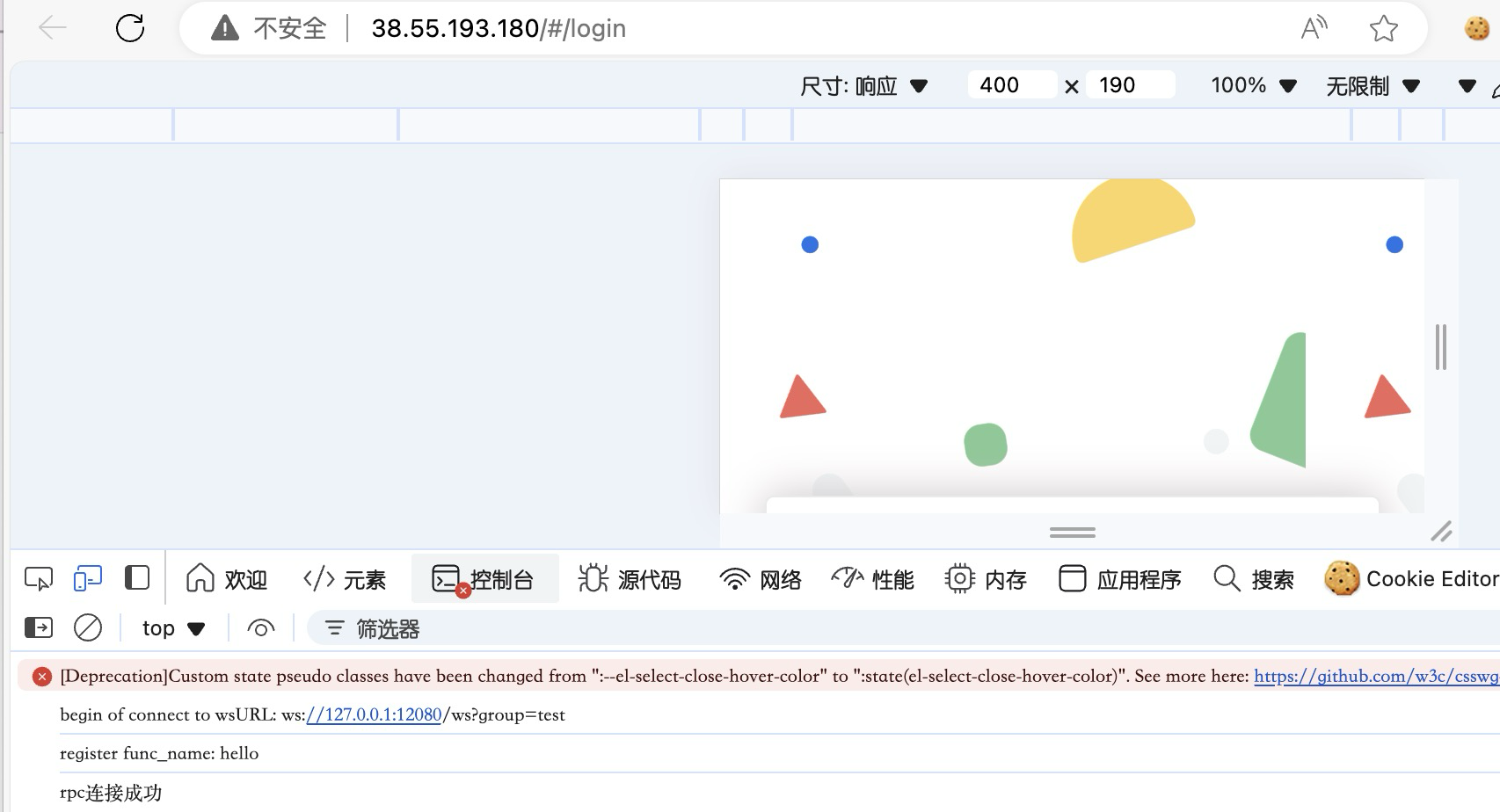
jsRpc连接,当我们打开浏览器后,先到控制台直接复制js_Env.js中所有内容到控制台打印,进行初始化:
js.Env.js
Text 1 2 3 4 5 6 7 8 9 10 11 12 13 14 15 16 17 18 19 20 21 22 23 24 25 26 27 28 29 30 31 32 33 34 35 36 37 38 39 40 41 42 43 44 45 46 47 48 49 50 51 52 53 54 55 56 57 58 59 60 61 62 63 64 65 66 67 68 69 70 71 72 73 74 75 76 77 78 79 80 81 82 83 84 85 86 87 88 89 90 91 92 93 94 95 96 97 98 99 100 101 102 103 104 105 106 107 108 109 110 111 112 113 114 115 116 117 118 119 function Hlclient(wsURL) { this.wsURL = wsURL; this.handlers = { _execjs: function (resolve, param) { var res = eval(param) if (!res) { resolve("没有返回值") } else { resolve(res) } } }; this.socket = undefined; if (!wsURL) { throw new Error('wsURL can not be empty!!') } this.connect() } Hlclient.prototype.connect = function () { console.log('begin of connect to wsURL: ' + this.wsURL); var _this = this; try { this.socket = new WebSocket(this.wsURL); this.socket.onmessage = function (e) { _this.handlerRequest(e.data) } } catch (e) { console.log("connection failed,reconnect after 10s"); setTimeout(function () { _this.connect() }, 10000) } this.socket.onclose = function () { console.log('rpc已关闭'); setTimeout(function () { _this.connect() }, 10000) } this.socket.addEventListener('open', (event) => { console.log("rpc连接成功"); }); this.socket.addEventListener('error', (event) => { console.error('rpc连接出错,请检查是否打开服务端:', event.error); }); }; Hlclient.prototype.send = function (msg) { this.socket.send(msg) } Hlclient.prototype.regAction = function (func_name, func) { if (typeof func_name !== 'string') { throw new Error("an func_name must be string"); } if (typeof func !== 'function') { throw new Error("must be function"); } console.log("register func_name: " + func_name); this.handlers[func_name] = func; return true } //收到消息后这里处理, Hlclient.prototype.handlerRequest = function (requestJson) { var _this = this; try { var result = JSON.parse(requestJson) } catch (error) { console.log("请求信息解析错误", requestJson); return } if (!result['action'] || !result["message_id"]) { console.warn('没有方法或者消息id,不处理'); return } var action = result["action"], message_id = result["message_id"] var theHandler = this.handlers[action]; if (!theHandler) { this.sendResult(action, message_id, 'action没找到'); return } try { if (!result["param"]) { theHandler(function (response) { _this.sendResult(action, message_id, response); }) return } var param = result["param"] try { param = JSON.parse(param) } catch (e) { } theHandler(function (response) { _this.sendResult(action, message_id, response); }, param) } catch (e) { console.log("error: " + e); _this.sendResult(action, message_id, e); } } Hlclient.prototype.sendResult = function (action, message_id, e) { if (typeof e === 'object' && e !== null) { try { e = JSON.stringify(e) } catch (v) { console.log(v)//不是json无需操作 } } this.send(JSON.stringify({"action": action, "message_id": message_id, "response_data": e})); } var demo = new Hlclient("ws://127.0.0.1:12080/ws?group=test");
显示下面的内容代表rpc客户端初始化成功
第二步,通过我们之前断点找到的加密函数复制给windows全局对象:
window.requestId=p
window.v1 = v
window.sign=a.a.MD5
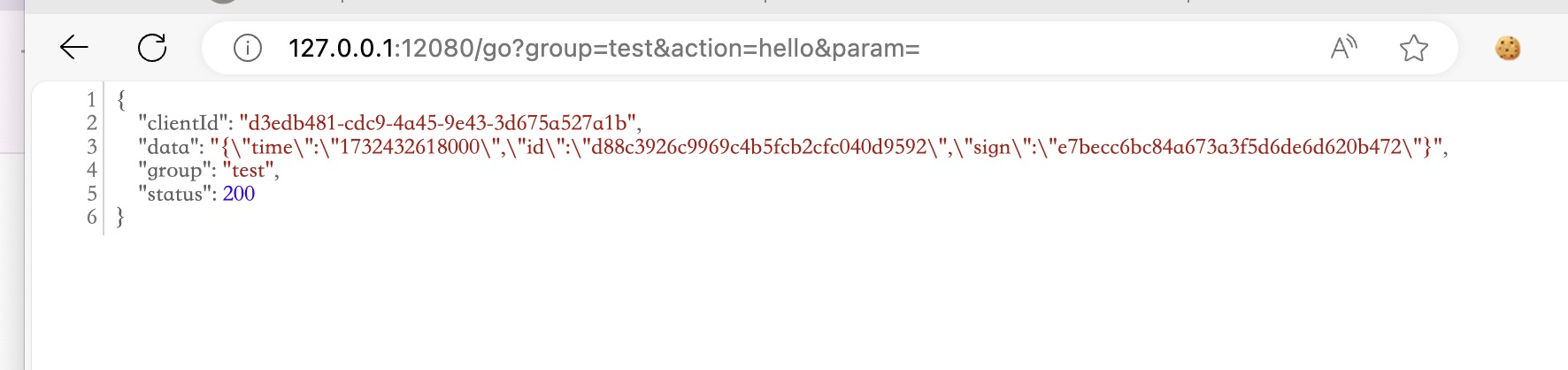
第三步,访问jsrpc服务端调试地址,成功获取通信结果内容,如下:
控制台输入:
Text 1 2 3 4 5 6 7 8 9 10 11 12 13 demo.regAction("hello",function (resolve,param) { n=JSON.stringify(v1(param)) var time = Date.parse(new Date); var id=requestId() var sg = sign(n+id+time).toString() var data={"time":"","id":"","sign":""} data["time"]=time.toString() data["id"]=id data["sign"]=sg resolve(data); }) 这里的意思就是向jsrpc服务端注册了hello函数,函数作用就是返回需要动态生成的time、requestld、sign。
在Galaxy的hook脚本中调用JsRpc服务端
通过之前的端点调试,我们已经知道了加解密用到的key、iv、算法,直接修改galaxy模版进行测试,如下:
只需要在burpsuite→服务端加密的方法中调用jsrpc接口获取time、requestId、sign进行请求头替换即可,GET请求无需解密。
效果如下:
完整hook代码:
Text 1 2 3 4 5 6 7 8 9 10 11 12 13 14 15 16 17 18 19 20 21 22 23 24 25 26 27 28 29 30 31 32 33 34 35 36 37 38 39 40 41 42 43 44 45 46 47 48 49 50 51 52 53 54 55 56 57 58 59 60 61 62 63 64 65 66 67 68 69 70 71 72 73 74 75 76 77 78 79 80 81 82 83 84 85 86 87 88 89 90 91 92 93 94 95 96 97 98 99 100 101 102 103 104 105 106 107 108 109 110 111 112 113 114 115 116 117 118 119 120 121 122 123 124 125 126 127 128 129 130 131 132 133 134 135 136 137 138 139 140 141 142 143 144 145 146 147 148 149 150 151 152 153 154 155 156 157 158 159 160 import json import base64 from java.org.m2sec.core.utils import ( CodeUtil, CryptoUtil, HashUtil, JsonUtil, MacUtil, FactorUtil, ) from java.org.m2sec.core.models import Request, Response from java.org.m2sec.core.outer import HttpClient from java.lang import String """ 内置示例,需要自定义代码文件时查看该文档:https://github.com/outlaws-bai/Galaxy/blob/main/docs/Custom.md 按 Ctrl(control) + ` 可查看内置函数 """ ALGORITHM = "AES/CBC/PKCS5Padding" secret = b"1234567891234567" iv = "1234567891234567" paramMap = {"iv": iv} jsonKey = "data" log = None def hook_request_to_burp(request): """HTTP请求从客户端到达Burp时被调用。在此处完成请求解密的代码就可以在Burp中看到明文的请求报文。 Args: request (Request): 请求对象 Returns: Request: 经过处理后的request对象,返回null代表从当前节点开始流量不再需要处理 """ if(request.getMethod()=="GET"): return request else: # 获取需要解密的数据 encryptedData = CodeUtil.b64decode(request.getBody()) # 调用内置函数解密 data = decrypt(encryptedData) # 更新body为已加密的数据 request.setContent(data) return request def hook_request_to_server(request): """HTTP请求从Burp将要发送到Server时被调用。在此处完成请求加密的代码就可以将加密后的请求报文发送到Server。 Args: request (Request): 请求对象 Returns: Request: 经过处理后的request对象,返回null代表从当前节点开始流量不再需要处理 """ if(request.getMethod()=="GET"): log.info("Request type: {}", type(request)) burpRequestBody='' url="http://127.0.0.1:12080/go?group=test&action=hello¶m=" jsrpcUrl=url+burpRequestBody jsrpcRequest=Request.of(jsrpcUrl) jsrpcRespone=HttpClient.send(jsrpcRequest) jsrpcResponeJson=jsrpcRespone.getJson() headData=jsrpcResponeJson["data"] headData=json.loads(headData) time=headData["time"] requestId=headData["id"] sign=headData["sign"] head=request.getHeaders() head.put("sign",sign) head.put("requestId",requestId) head.put("timestamp",time) request.setHeaders(head) return request # 获取被解密的数据 else: log.info("Request type: {}", type(request)) data = request.getContent() burpRequestBody=request.getBody() url="http://127.0.0.1:12080/go?group=test&action=hello¶m=" jsrpcUrl=url+burpRequestBody jsrpcRequest=Request.of(jsrpcUrl) jsrpcRespone=HttpClient.send(jsrpcRequest) jsrpcResponeJson=jsrpcRespone.getJson() headData=jsrpcResponeJson["data"] headData=json.loads(headData) time=headData["time"] requestId=headData["id"] sign=headData["sign"] head=request.getHeaders() head.put("sign",sign) head.put("requestId",requestId) head.put("timestamp",time) request.setHeaders(head) # 调用内置函数加密回去 encryptedData = encrypt(data) # 将已加密的数据转换为Server可识别的格式 body = CodeUtil.b64encode(encryptedData) # 更新body request.setContent(body) log.info("header2: {}",request) return request def hook_response_to_burp(response): """HTTP请求从Server到达Burp时被调用。在此处完成响应解密的代码就可以在Burp中看到明文的响应报文。 Args: response (Response): 响应对象 Returns: Response: 经过处理后的response对象,返回null代表从当前节点开始流量不再需要处理 """ # 获取需要解密的数据 encryptedData = CodeUtil.b64decode(response.getBody()) # 调用内置函数解密 data = decrypt(encryptedData) # 更新body response.setContent(data) return response def hook_response_to_client(response): """HTTP请求从Burp将要发送到Client时被调用。在此处完成响应加密的代码就可以将加密后的响应报文返回给Client。 Args: response (Response): 响应对象 Returns: Response: 经过处理后的response对象,返回null代表从当前节点开始流量不再需要处理 """ # 获取被解密的数据 data = response.getContent() # 调用内置函数加密回去 encryptedData = encrypt(data) # 更新body # 将已加密的数据转换为Server识别的格式 body = CodeUtil.b64encode(encryptedData) # 更新body response.setContent(body) return response def decrypt(content): return CryptoUtil.aesDecrypt(ALGORITHM, content, secret, paramMap) def encrypt(content): return CryptoUtil.aesEncrypt(ALGORITHM, content, secret, paramMap) def set_log(log1): """程序在最开始会自动调用该函数,在上方函数可以放心使用log对象""" global log log = log1
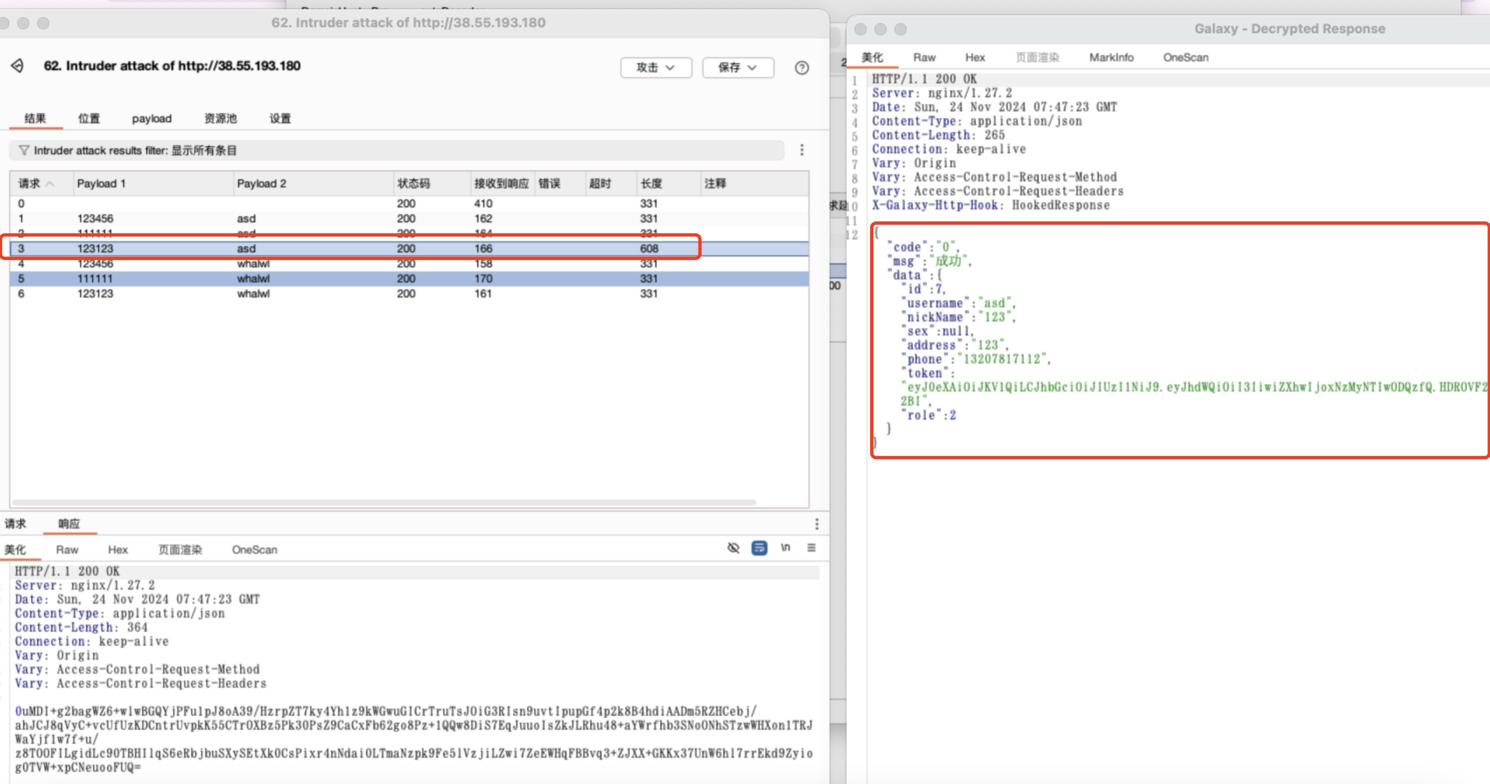
这时候我们发现网站还存在验证码复用逻辑,跳过验证码识别阶段,直接上枚举,如下:
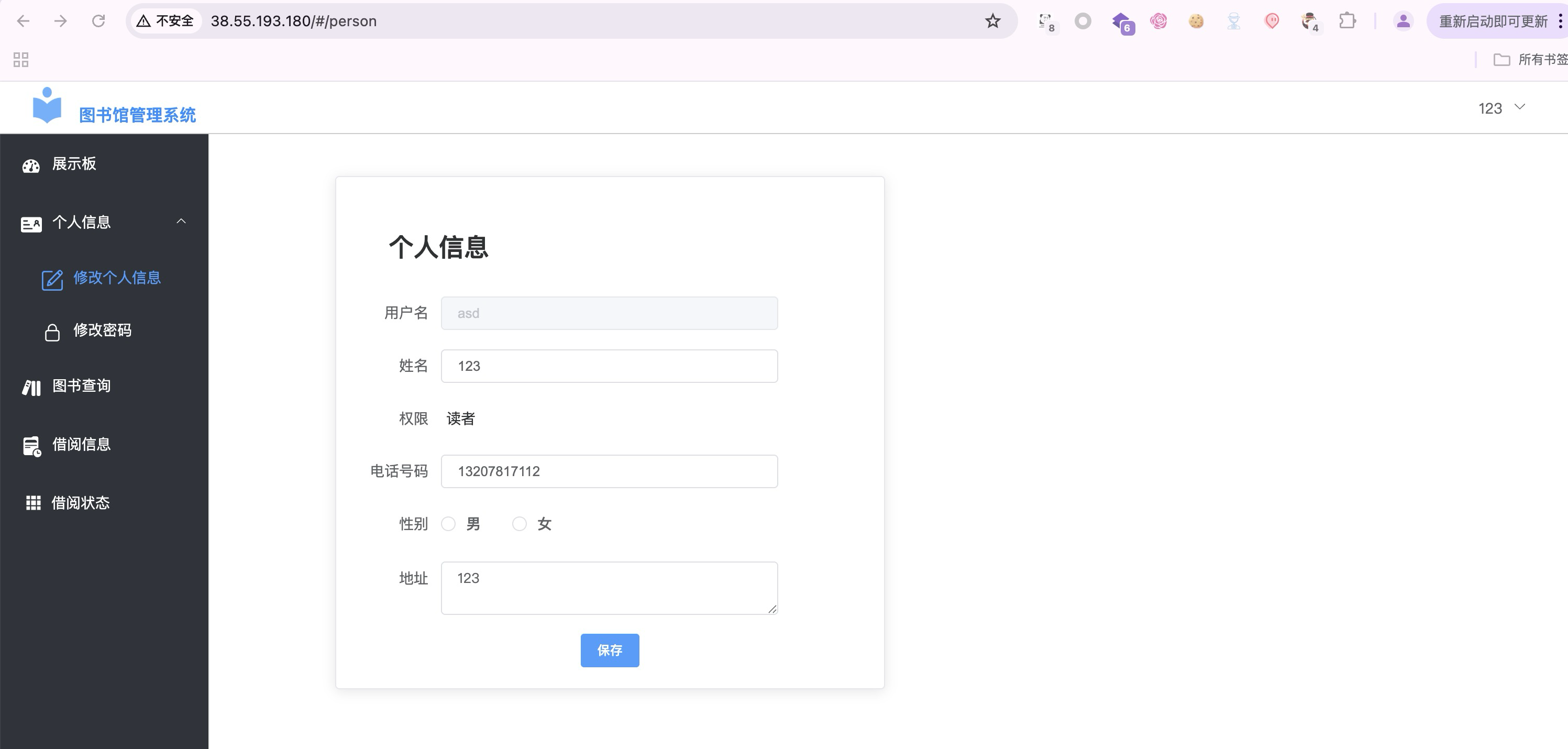
成功枚举到账号asd/123123,登陆系统如下:
注:由于sign生成包含了当前时间戳,爆破的时候不要太快,容易报错,尽量1线程即可。